

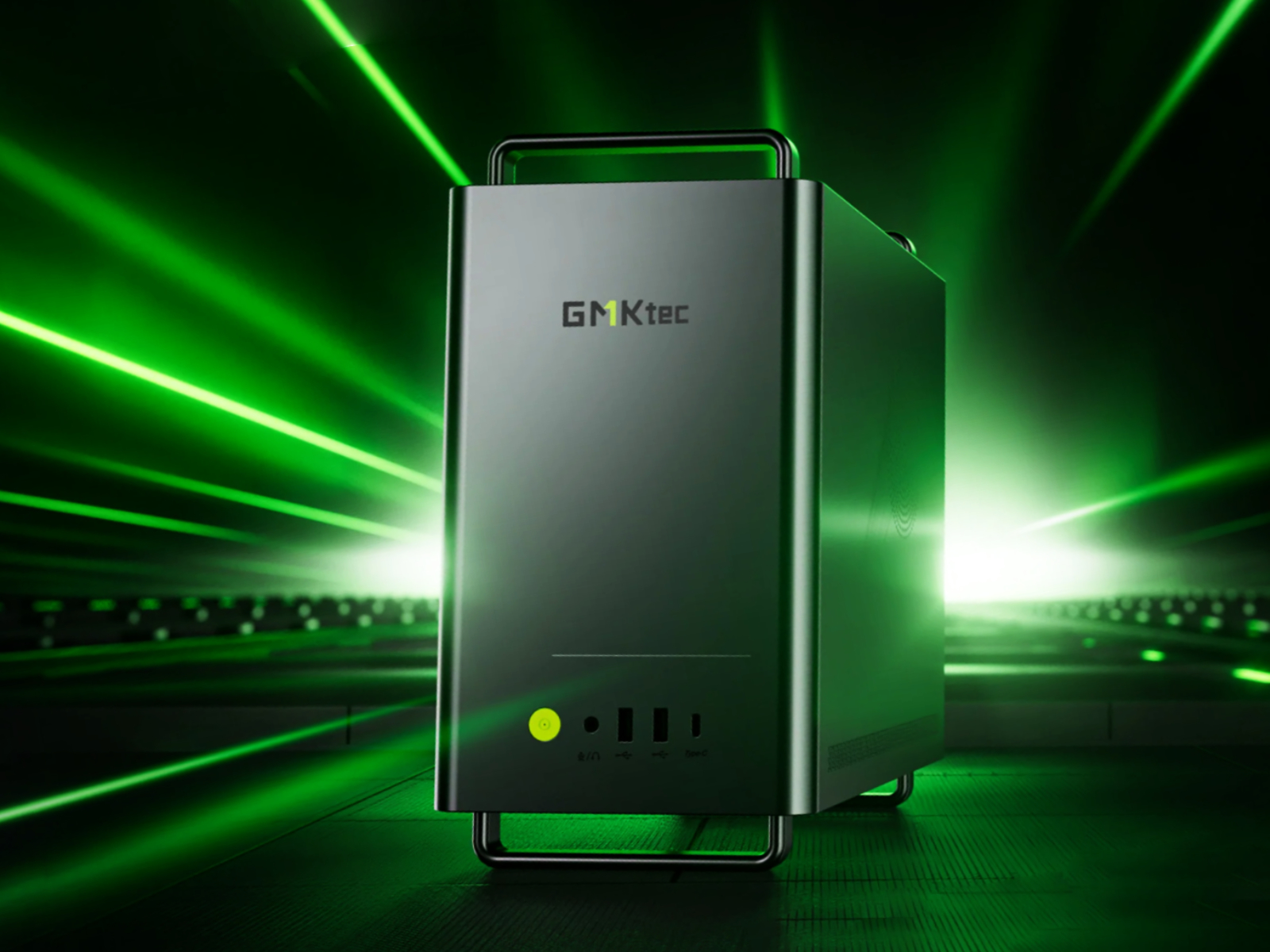
Desktop computing has undergone a massive shift in recent years. Massive tower PCs that hog desk space and drain excessive power are quickly being replaced by ultra-compact Mini PCs. Among the top manufacturers driving this revolution, GMKtec has emerged as a major player. Known for packing workstation-level specs into hardware no larger than a stack of sticky notes, GMKtec has drawn significant attention from remote workers, creators, casual gamers, and tech enthusiasts.
In this deep-dive review, we analyze GMKtec’s entire ecosystem—from budget home-office boxes to cutting-edge AI computing powerhouses equipped with high-performance Neural Processing Units (NPUs). Is a GMKtec Mini PC worth your investment over traditional desktop builds or established legacy brands? Let’s examine the hardware, performance, real-world usability, and overall value.
What is GMKtec?
GMKtec (often referred to simply as GMK) is an innovative technology brand specializing in the research, design, and manufacturing of ultra-small form factor (USFF) computers, mini PCs, and high-density computing modules.
By eliminating the unnecessary bulk, costly proprietary form factors, and high power overhead of traditional desktop rigs, GMKtec delivers flexible personal computers that fit in the palm of your hand. They cater to a wide audience—ranging from students needing a quiet Web browsing machine to professional developers running local Large Language Models (LLMs) and containerized workflows.
GMKtec Overview
Headquartered in Shenzhen, China—the world’s primary hardware manufacturing hub—GMKtec operates with an agile direct-to-consumer and business-to-business model. Founded by engineers with deep backgrounds in consumer electronics and thermal engineering, GMKtec initially gained traction on crowdfunding platforms before scaling up global distribution via its official web store (gmktec.com), Amazon, and major third-party tech retailers.
Unlike brands that rely purely on rebadging white-label OEM chassis, GMKtec invests heavily in custom PCB layouts, dual-fan thermal systems, and high-speed port configurations like OCuLink and USB4. This focus on engineering has allowed GMKtec to rapidly update its product lineup alongside AMD and Intel’s latest processor releases.
GMKtec Product Range Explained
GMKtec categorizes its product library into clear product lines designed for specific budgets and workloads:
- G-Series (Budget & Home Office): Ultra-affordable mini PCs driven by efficient Intel N-series processors or entry-level AMD Ryzen chips. Designed for basic productivity, 4K media streaming, signages, and home labs.
- M-Series (Mainstream Business & Productivity): Mid-range workhorses powered by AMD Ryzen 5/7 U-series and HS-series, or Intel Core i5/i7 chips. Excellent for heavy multitasking, video editing, and office environments.
- K-Series (Performance & High-End Gaming): High-performance systems featuring top-tier processors (AMD Ryzen 7/9 8000 & 9000 series, Intel Core Ultra) paired with fast Radeon 780M graphics or Intel Arc iGPUs.
- EVO & NEO Series (Flagship AI & Enthusiast Workstations): The pinnacle of GMKtec engineering. Designed for extreme local AI workloads, high-end content creation, and AAA gaming via high-speed external GPU (eGPU) expansion or built-in high-performance silicon.
Key Features of GMKtec Mini PCs
Across its entire range, GMKtec PCs share several signature features that differentiate them from standard desktop computers:
- Ultra-Compact Footprint: Most units measure roughly $4.5 \times 4.5 \times 1.8$ inches, easily mounting behind monitors via VESA brackets.
- Tool-Free or Easy-Access Chassis: Quick-release top panels or magnetic latches allow users to upgrade RAM and M.2 SSD storage in seconds.
- Advanced Thermal Designs: Custom vapor chambers, dual copper heat pipes, and whisper-quiet turbine cooling fans prevent thermal throttling under heavy CPU loads.
- Next-Gen Expansion Ports: Native support for USB4 (40Gbps) and OCuLink (PCIe $4.0 \times 4$, up to 64Gbps bandwidth) for lossless external GPU expansion.
- Multi-Display & High-Speed Networking: Triple and quadruple 4K/8K display support combined with dual 2.5G Ethernet ports for home server setups.
GMKtec Mini PC Series Explained
                     ┌─────────────────────────────────────────┐
                     │          GMKtec Mini PC Range           │
                     └────────────────────┬────────────────────┘
                                          │
      ┌──────────────────┬────────────────┴──────────────────┬──────────────────┐
      │                  │                                   │                  │
┌─────┴──────┐     ┌─────┴──────┐                      ┌─────┴──────┐     ┌─────┴──────┐
│  G-Series  │     │  M-Series  │                      │  K-Series  │     │ EVO / NEO  │
│  (Budget)  │     │(Mainstream)│                      │(Performance│     │ (Flagship  │
└────────────┘     └────────────┘                      │  / Gaming) │     │ Workstation│
                                                       └────────────┘     │   & AI)    │
                                                                          └────────────┘
G-Series
Models like the GMKtec NucBox G3 / G3S (Intel Alder Lake N95 / N100) and G10 / G11 (AMD Ryzen 5) lead this entry-level lineup. These units draw minimal power (often under 15W TDP) while comfortably handling 1080p/4K video playback, Web browsing with dozens of tabs, and Microsoft Office apps.
M-Series
Models like the M5 Ultra, M6 Ultra, and M8 leverage AMD Ryzen 5 PRO 6650H and Ryzen 7 7730U chips. They strike an optimal balance between price and multitasking performance, supporting up to 64GB DDR4/DDR5 RAM and dual M.2 PCIe NVMe SSD slots.
K-Series
Represented by models such as the K8 Plus (AMD Ryzen 7 8845HS) and K17 / K17 Plus (Intel Core Ultra series). These mini PCs bring desktop-grade multi-threaded performance, integrated AMD Radeon 780M or Intel Arc graphics, and built-in Neural Processing Units (NPUs).
EVO & NEO Series
The EVO-X1, EVO-X2, and NEO-X1 Pro showcase top-tier engineering. Built around powerful processors like the AMD Ryzen AI 9 HX 370 / HX 470 and Ryzen AI Max+ 395, these units deliver up to 120+ TOPS of local AI performance and feature support for up to 128GB of LPDDR5X high-speed memory.
Performance & Hardware
Performance across the GMKtec lineup is determined by processor selection and thermal engineering:
| Series | Target Processor Family | Average Cinebench R23 (Multi) | Typical Power Consumption |
| G-Series | Intel N95 / N100 / AMD Ryzen 3 | ~2,800 – 3,500 | 6W – 15W |
| M-Series | AMD Ryzen 5/7 U-Series & HS | ~8,500 – 11,500 | 15W – 35W |
| K-Series | AMD Ryzen 7/9 8000/9000 & Intel Ultra | ~13,000 – 16,500 | 35W – 65W |
| EVO Series | AMD Ryzen AI 9 HX / AI Max+ 395 | ~22,000 – 28,000+ | 54W – 120W+ |
GMKtec utilizes high-speed memory architectures (DDR4-3200 up to DDR5-5600 and LPDDR5X-8000) alongside PCIe 4.0 NVMe SSDs. Their bios settings also allow users to toggling between Quiet Mode (low TDP, near-silent fan profiles) and Performance Mode (unlocked TDP for maximum sustained benchmark output).
AI Computing & AI PC Capabilities
With local artificial intelligence becoming a standard computing requirement, GMKtec has optimized its high-tier mini PCs for AI workloads.
┌─────────────────────────────────────────────────────────────┐
│                 GMKtec AI Architecture                      │
├──────────────────┬──────────────────┬───────────────────────┤
│    CPU Cores     │    iGPU Cores    │    Dedicated NPU      │
│ (General Tasks)  │ (Graphics & LLMs)│ (Efficient AI Inference)│
└────────┬─────────┴────────┬─────────┴───────────┬───────────┘
         │                  │                     │
         └──────────────────┼─────────────────────┘
                            ▼
          Unified On-Device AI Computing
          - Up to 120+ TOPS Combined Power
          - Local LLMs (Llama, Mistral)
          - On-Device Diffusion Models & Copilot+
Models equipped with AMD XDNA 2 NPUs and Intel AI Boost offer up to 100+ TOPS (Trillions of Operations Per Second) of local AI performance. This hardware capability allows users to:
- Run local Large Language Models (e.g., Llama 3, Ollama, LM Studio) completely offline without sending sensitive data to the cloud.
- Execute fast Stable Diffusion image generation locally using integrated GPU acceleration.
- Utilize real-time AI noise cancellation, smart background blurs, and automatic live transcription during video calls with low power draw.
Gaming & Graphics Performance
While budget G-series models are limited to retro emulation, esports titles (League of Legends, CS:GO at low settings), and 2D games, GMKtec’s K-Series and EVO-Series offer capable gaming hardware:
- Integrated Graphics (AMD Radeon 780M / 890M): Delivers playable 1080p framerates (45–70 FPS) in modern AAA games like Cyberpunk 2077, Shadow of the Tomb Raider, and Forza Horizon 5 when paired with FSR (FidelityFX Super Resolution) upscaling.
- OCuLink & USB4 eGPU Expansion: For competitive PC gaming, models with OCuLink or USB4 ports can connect directly to desktop graphics cards (such as an NVIDIA RTX 4070 or RTX 5070 eGPU dock). OCuLink connects directly via PCIe lanes, providing lossless eGPU performance compared to traditional Thunderbolt setups.
Connectivity, Ports & Expandability
GMKtec mini PCs provide a comprehensive port selection on both front and rear panels:
- Display Outputs: HDMI 2.1, DisplayPort 1.4, and full-featured Type-C ports supporting 3 to 4 simultaneous displays at up to 8K resolution.
- High-Speed Networking: Dual 2.5 Gigabit RJ45 LAN ports are standard across most M and K series models. This makes GMKtec PCs popular for home labs, custom routers (PFsense/OPNsense), and media servers (Plex/Jellyfin).
- Wireless: Integrated Wi-Fi 6 / Wi-Fi 6E and Bluetooth 5.2 / 5.3 modules ensure stable high-speed wireless connectivity.
Storage & Memory Options
GMKtec sells its computers in two configurations:
- Prebuilt Configurations: Comes factory-equipped with DDR4 or DDR5 RAM, a M.2 PCIe NVMe SSD, and a licensed installation of Windows 11 Pro.
- Barebone Kits: Supplied without RAM, SSD, or operating system. This option appeals to builders who prefer to install custom storage drives (e.g., Samsung 990 Pro) or run specialized OS environments like Linux, Proxmox, or TrueNAS.
Most mid-to-high-tier GMKtec chassis house dual M.2 2280 NVMe slots supporting up to 8TB to 16TB of internal storage expansion.
Operating System & Software Experience
Prebuilt GMKtec Mini PCs ship with a clean installation of Windows 11 Pro. Unlike traditional OEM desktops, GMKtec systems are free from bloatware, pre-installed trial software, or heavy background management applications.
Furthermore, GMKtec offers strong Linux support. Distributions like Ubuntu, Fedora, Linux Mint, and Arch Linux detect all onboard Wi-Fi, Bluetooth, GPU, and audio hardware out of the box, making these mini PCs versatile solutions for open-source workflows.
GMKtec Pricing Overview
GMKtec maintains a competitive pricing structure by distributing directly from manufacturing networks:
- G-Series (Budget): $120 – $220 USD
- M-Series (Mainstream): $250 – $420 USD
- K-Series (Performance/Gaming): $450 – $750 USD
- EVO & NEO Series (High-End Workstation/AI): $950 – $2,200+ USD
Pros & Cons
Pros
- Exceptional Value: Higher hardware performance per dollar compared to traditional desktop brands.
- Compact & Space-Saving: Easily fits under displays, mounts via VESA, or packs into travel bags.
- Expandability Options: High-speed OCuLink and USB4 interfaces allow lossless eGPU integration.
- Dual 2.5G LAN Ports: Excellent hardware platform for network routing, home labs, and servers.
- Clean OS Environment: Ships with bloatware-free Windows 11 Pro licenses.
Cons
- Limited Desktop GPU Upgradeability: Internal upgrades are restricted to RAM and M.2 SSDs (external GPUs require an eGPU dock).
- Fan Noise Under Maximum TDP Load: Ultra-compact cooling fans can produce an audible high-pitched hum when pushed to maximum capacity.
- Direct Manufacturer Support Delays: Customer service responses may take longer compared to legacy brands with localized physical service centers.
Setup & Installation Experience
Setting up a GMKtec Mini PC takes just a few minutes:
User Experience
In daily practical use, GMKtec mini PCs perform smoothly. Office tasks, multi-tab Web browsing, 4K video playback, and Zoom meetings run responsiveness without lag. System boot times average under 10 seconds thanks to high-speed NVMe SSD initialization. Thermal management keeps external chassis temperatures comfortable during normal workloads.
Customer Support, Warranty & Returns
GMKtec provides a standard 1-Year Manufacturer Warranty covering hardware failures and component defects. When purchasing directly from their website or authorized channels, users receive warranty support, software driver downloads, and BIOS updates. For smoother return policies and faster shipping, purchasing through Amazon fulfillment provides additional buyer protection.
Safety, Security & Reliability
GMKtec devices carry international safety certifications, including CE, FCC, RoHS, and PSE. Thermal protection mechanisms built into the BIOS automatically throttle CPU frequencies or shut down the system if temperatures reach critical limits, safeguarding internal components during prolonged heavy workloads.
GMKtec vs Competitors
| Feature / Brand | GMKtec | Beelink | Minisforum | GEEKOM | Intel / ASUS NUC |
| Pricing | Aggressive / Low | Competitive | Mid to High | Premium | Very High |
| OCuLink Support | Broad Lineup | Select Models | Select Models | Rare | Rare |
| Dual 2.5G LAN | Standard (M/K Series) | Common | Common | Select Models | Select Models |
| Build Quality | Polymer & Aluminum | Polymer & Mesh | Metal & Polymer | Full Metal / Premium | Enterprise Grade |
| AI Workstation Focus | High (EVO Series) | Moderate | High | Moderate | Moderate |
Who Should Buy GMKtec?
A GMKtec Mini PC is an ideal fit for:
- Home & Office Workers: Professionals looking to clear desktop clutter with a fast, quiet system.
- Tech Enthusiasts & Developers: Users who need a low-power home server, media box, network router, or virtual machine node.
- AI Developers & Researchers: Users building and executing local LLMs and AI workflows on compact hardware.
- Casual & Esports Gamers: Gamers seeking 1080p gaming performance without buying a full-sized gaming desktop tower.
Expert Verdict
GMKtec has earned its place as one of the leading mini PC brands in today’s hardware market. By offering versatile hardware configurations—from ultra-budget office boxes to high-performance AI workstations—GMKtec delivers incredible value per dollar.
For users seeking space efficiency, modern port options like USB4 and OCuLink, and strong multi-threaded computing power, GMKtec represents a reliable and cost-effective modern desktop solution.
Frequently Asked Questions (FAQs)
Can I upgrade a GMKtec Mini PC later?
Yes. RAM (SO-DIMM DDR4/DDR5) and M.2 NVMe SSD storage are fully upgradeable on barebone and prebuilt models. The CPU and iGPU are soldered directly to the motherboard and cannot be upgraded independently.
Are GMKtec Mini PCs good for 24/7 home server operations?
Yes. Models equipped with dual 2.5G LAN ports and low idle power consumption (5W–15W) make excellent Proxmox hosts, Plex media servers, network storage nodes, and home automation hubs.
Can GMKtec mini PCs run games smoothly?
K-Series and EVO-Series models featuring AMD Radeon 780M / 890M integrated graphics run esports titles and modern games at 1080p with stable framerates. Adding an external GPU via OCuLink or USB4 unlocks full desktop-level AAA gaming performance.
Final Conclusion
GMKtec demonstrates how much performance modern technology can pack into tiny form factors. Whether you need a simple home-office station, an efficient media server, or a high-performance local AI development rig, GMKtec provides versatile, high-value mini PCs tailored to modern computing needs.
